

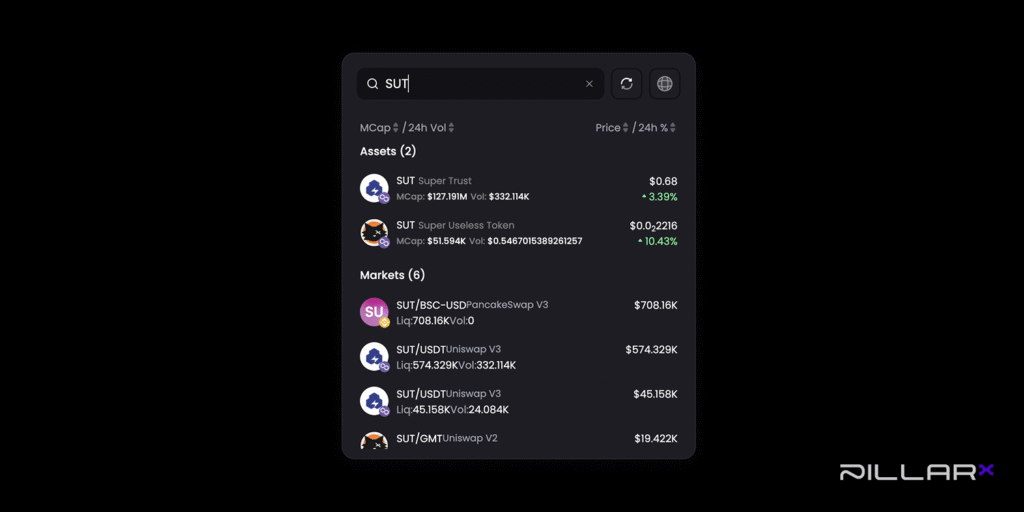
You’ll see a clear separation between Assets (single tokens) and Markets (liquidity pairs), making it effortless to understand what you’re looking at and take action confidently.
This update brings more structure to token discovery and removes the confusion that comes from mixing assets and pairs in a single list.
What’s New in Search 2.0
Search results are now separated into two intuitive categories:
1. Assets
Tokens grouped under “Assets” are multi-chain, meaning the same token exists on multiple blockchains (for example, AAVE). When you search for a multi-chain asset, the search automatically selects the token on the blockchain where you hold the most USDC and where the token has the highest liquidity.
If you’re looking for a specific token, for example, AAVE on Optimism, you can use the blockchain filter (globe icon) to choose the exact network you want.
Assets that are not multi-chain are always shown with a blockchain label, so you can immediately see which network they belong to.
2. Markets
When you select a market, you use that market’s liquidity pool to make your purchase. For example, if you choose PLR/ETH, you will buy PLR using liquidity from that pool.
You can also see how much liquidity is available for each token. Seeing available liquidity helps you understand how easy it is to buy the token and at what price.
How Trading Works on PillarX
Trading on PillarX happens through the built-in Pulse App and always uses USDC. When you buy a token, you’re exchanging USDC from your portfolio for that asset. When you sell a token, the value automatically returns to USDC.
If you start with a different token, like ETH, you’ll need to swap it into USDC before buying other assets. Once you have USDC, you can trade tokens on any supported chain. Just make sure your Universal Gas Tank has enough balance to cover network fees and you’re ready to trade across chains without any interruptions.
Why The Updated Search Matters
The new structure makes token discovery easier, faster, and more reliable.
- No more confusing token pairs listed as assets. Assets are cleanly separated from liquidity pairs, so you immediately know what you’re selecting.
- More transparency for active traders. Seeing liquidity and chain data up front helps you assess markets at a glance.
- A smoother, more intuitive search flow. Everything is organised logically.
- When you choose a pair like PLR/ETH, the system knows the underlying token is PLR and the “Buy” action aligns with that asset.
- Log in to your PillarX account
- Open Pulse in the App section
- Use the search bar to explore assets and markets
⚡️⚡️⚡️⚡️⚡️⚡️⚡️⚡️⚡️⚡️⚡️⚡️⚡️⚡️⚡️⚡️⚡️⚡️⚡️⚡️⚡️⚡️⚡️⚡️⚡️⚡️⚡️⚡️⚡️⚡️
Boost Your Trading Strategy With PillarX Data-Driven Signals
Start a free 7-day trial and get algorithmic event data with suggested entry, stop, and profit thresholds.
⚡️⚡️⚡️⚡️⚡️⚡️⚡️⚡️⚡️⚡️⚡️⚡️⚡️⚡️⚡️⚡️⚡️⚡️⚡️⚡️⚡️⚡️⚡️⚡️⚡️⚡️⚡️⚡️⚡️⚡️
Token Search 2.0 represents another step toward creating a smarter, cleaner PillarX experience. It improves accuracy and gives users a more reliable way to explore and interact with the crypto assets they care about.
Follow us
PillarX | X(Twitter) | Discord | Telegram
Disclaimer: Cryptocurrency investments involve market risk. The information in our publications and on the PillarX website does not constitute financial advice. Please conduct your own research before making any financial decisions.